


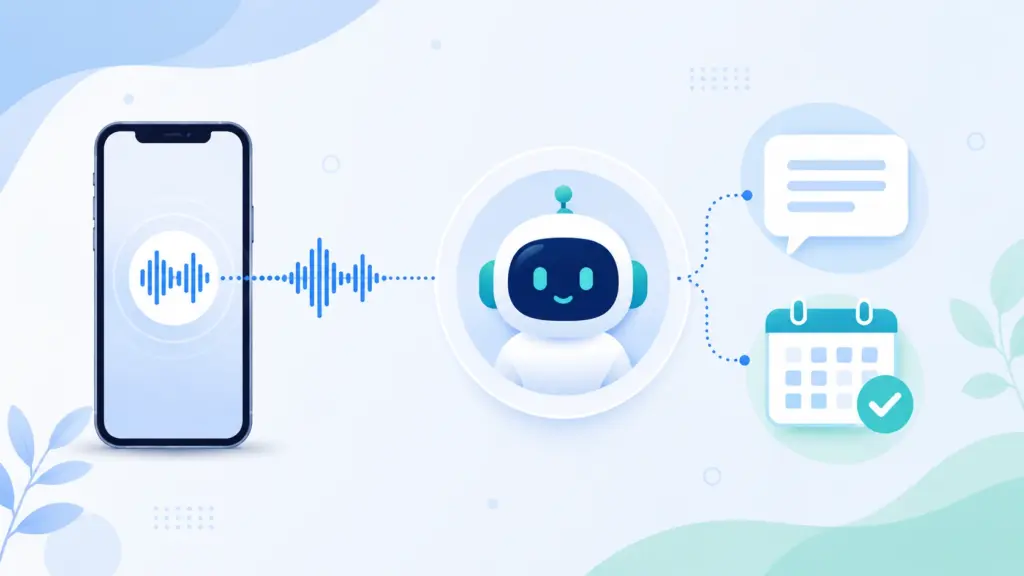
An AI receptionist answers a phone call, converts the caller’s speech to text in real time, uses a language model to work out what the caller actually wants, decides the right action (answer a question, book an appointment, or transfer the call), and replies out loud using synthesized speech all in under a second per turn, repeating this loop until the call is resolved. It also logs every call into a CRM and hands off anything urgent or unusual to a real team member.
That’s the one-sentence version. If you want to actually understand the mechanics not the marketing copy keep reading. This guide breaks down exactly what happens between the moment your phone rings and the moment the call ends, what “training” an AI receptionist on your business really means, and where a human still needs to be in the loop.
📌 Key Takeaways
- It’s a four-step loop, not a script. Listen (speech-to-text) → understand (natural language processing) → decide (business logic) → respond (voice synthesis). This repeats every single turn of the conversation.
- It isn’t a phone tree. Callers talk in full sentences. The system works out intent instead of forcing anyone to “press 1 for sales.”
- Bookings happen live, on the call – not as a message someone follows up on three hours later.
- The knowledge base is built automatically, from your website and documents, then refined by a human before it ever answers a real caller.
- Every call is logged, and anything that needs a human – an emergency, a complaint, an ambiguous request – gets handed to a real person with full context attached.
- Not every provider does all of this well. Some only take messages. Some can’t hold a real conversation. The differences only show up on a live test call, which is why we’ve included exactly what to test for below.
What Is an AI Receptionist?
An AI receptionist is software that answers business phone calls, understands natural spoken language the way a person would, and takes action booking, logging, answering, or transferring without a human physically picking up the phone. Unlike a traditional answering service, it doesn’t just record a message. Unlike an IVR (“press 1 for sales”), it doesn’t force the caller through a menu tree. It listens to what’s actually said and responds accordingly.
At a functional level, it typically handles:
- Answering common questions (pricing, hours, services, availability)
- Booking, rescheduling, or cancelling appointments directly in your calendar
- Qualifying leads and collecting caller details
- Logging every interaction into a CRM automatically
- Escalating urgent, complex, or emotionally sensitive calls to a real person
For decades, the only alternative to a live receptionist was voicemail or an IVR menu both of which callers generally dislike. The comparison between AI receptionists and human receptionists goes deeper into where each option actually wins, but the short version is: an AI receptionist removes the “press a button or leave a message” trade-off entirely. The caller just talks.
The Core Process: What Actually Happens on a Call
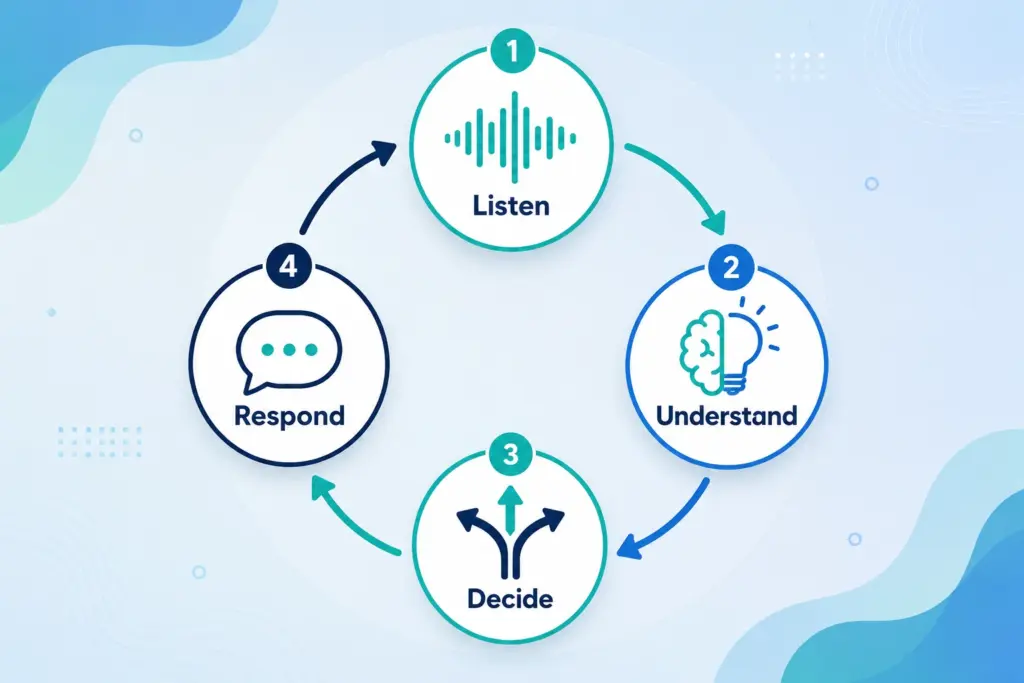
Once the phone rings, four things happen in rapid succession and this loop repeats every time the caller speaks, until the call is resolved.
Step 1: Listening Speech-to-Text (ASR)
The instant a caller starts talking, an Automatic Speech Recognition (ASR) engine converts their voice into text, word by word, while filtering out background noise, call static, and crosstalk. This step has to be close to perfect, because any transcription error carries forward into every step after it a system that mishears “Tuesday” as “today” will book the wrong appointment no matter how smart the rest of it is.
This is also why accents, poor mobile signal, and people talking over each other are the hardest technical problems in this space, and why the more capable platforms spend a disproportionate amount of engineering effort here rather than on the voice itself.
Step 2: Understanding Natural Language Understanding (NLU)
Text alone doesn’t mean anything until the system works out intent. This is the job of natural language processing and large language models, and it’s the part that separates an AI receptionist from a keyword-matching chatbot.
For example: “I was hoping someone could come look at my hot water system this week” contains no keyword that maps neatly to “plumbing repair.” A capable system has to infer that this is a service request, that there’s an implied urgency (“this week”), and that it likely needs to move straight into scheduling without the caller ever using the word “book.”
The harder part is context across the whole call, not just one sentence. If the caller later says, “actually, can we make it Thursday instead?”, the system needs to know “it” refers to the appointment discussed two sentences ago. This contextual memory is what actually separates a modern AI receptionist from the rigid, dead-end voice bots of ten years ago and it’s worth specifically testing on a demo call, because it’s the thing cheaper systems fake the worst.
Step 3: Deciding – Business Logic and Actions
Once intent is clear, the system decides what to do with it, against a set of rules the business has configured: check the calendar, pull an answer from the knowledge base, start an intake flow, or flag the call for a human. This is the step most competitor explainers skip entirely, but it’s arguably the most important one – it’s where the AI stops being a chatbot and starts being a receptionist that actually completes tasks.
Step 4: Responding – Text-to-Speech (TTS)
The system’s decision gets converted into a spoken reply using voice synthesis. Modern synthetic voices vary pace, tone, and emphasis well enough that a large share of callers don’t clock that they’re speaking with software at all. Replies are generated dynamically for that specific conversation, not pulled from a fixed script – which is why the same question asked two different ways gets two differently worded (but consistent) answers.
These four steps – listen, understand, decide, respond – repeat continuously until the call resolves. That loop, end to end, is the complete answer to “how do AI receptionists work.”
AI Receptionist vs. Voicemail vs. IVR Phone Tree
| Feature | AI Receptionist | Voicemail | IVR Phone Tree |
| Caller interaction | Natural conversation | One-way message only | Button-press menus |
| Availability | 24/7, active | 24/7, passive | 24/7, passive |
| Appointment booking | Live, during the call | Not possible | Rare, and clunky |
| Lead logging | Automatic, into CRM | Manual, if anyone follows up | Manual |
| Urgent call handling | Rule-based transfer to a human | None | Limited, pre-set routing |
| Caller experience | Generally positive | Often frustrating | Frequently disliked |
For a closer look at where a traditional auto attendant differs from an AI receptionist since the two get confused constantly the short version is that an auto attendant is still a menu tree with better branding, while an AI receptionist has no fixed menu at all.
How an AI Receptionist Learns Your Business Before It Ever Answers a Call
An AI receptionist can’t answer a single real call until it has a working knowledge base your services, prices, hours, and policies. Providers generally build this one of three ways:
| Method | How it works | Best for |
| Automatic | The system crawls your website and any uploaded documents, extracting services, pricing, and hours on its own | Fast setup, a solid first draft |
| Manual | You or your team type information directly into the platform | Filling gaps the website doesn’t cover |
| Hybrid | AI builds the first draft from your site; a person reviews and corrects it | Best accuracy for the least manual effort the standard most reliable providers use |
No coding is required at any point. You typically just provide a website URL and a document or two (an FAQ, a price list, a services page), and the system builds its own understanding of what you offer, when you’re open, and what counts as urgent. First setup usually takes minutes. What actually determines quality is what happens after that: reviewing the first one to two weeks of real call transcripts and correcting anything the AI got wrong or vague on. Skipping that review step is the single most common reason an AI receptionist underperforms see the mistakes section below.
For a full walkthrough of what to actually compare between providers at this stage, our guide to choosing an AI receptionist covers the questions worth asking before you sign a contract.
What a Real Call Actually Looks Like
Here’s a realistic example of the loop in practice, for a service business:
Caller: Hi, I need someone to come check my air conditioner, it’s not blowing cold air.
AI: I can help with that. Is this for your home or a business address, and is it something you need looked at urgently, or can it wait a few days?
Caller: “It’s for the house, and honestly it’s pretty hot in here, so sooner would be great.”
AI: Understood I have a technician available tomorrow at 10 a.m. or Thursday at 2 p.m. Which works better?
Caller: Tomorrow at 10 works.
AI: Great, you’re booked for tomorrow at 10 a.m. I’ll text you a confirmation now. Can I grab your name and the address for the visit?
Notice what happened: no menu, no “please hold,” and the appointment is confirmed before the caller hangs up not promised as a callback. That’s the functional difference between a real AI receptionist and a glorified voicemail box, and it’s worth listening for specifically on any demo call you take.
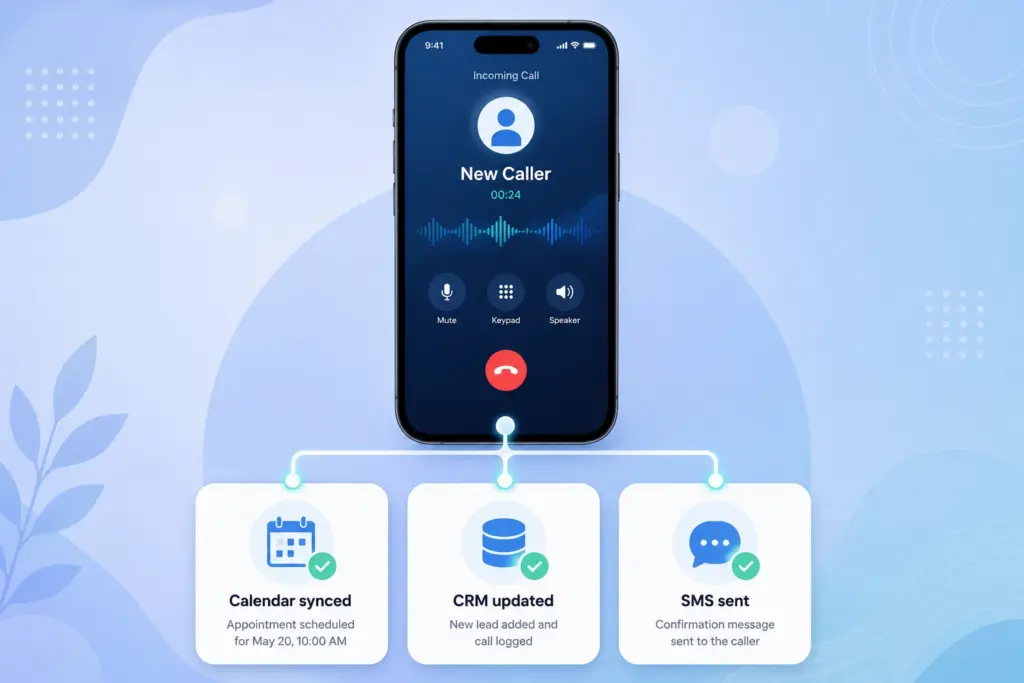
Appointment Booking, Mid-Call
The system connects directly to a live calendar, checks real availability, offers open slots, and confirms the booking there and then. Not “we’ll call you back to confirm” confirmed, on the call.
CRM Logging and Follow-Ups
After every call, the caller’s name, number, reason for calling, and a summary get pushed automatically into a CRM or webhook, so no lead depends on someone remembering to write it down. Many systems also send an SMS follow-up a booking confirmation, a link, or your hours before the caller even hangs up, which measurably cuts no-shows. For a look at what this actually prevents on the revenue side, our breakdown of what a missed call costs a business puts real numbers around it.
If you want to see the range of jobs an AI voice agent handles beyond the front desk sales qualification, support triage, order status this rundown of AI voice agent use cases is worth a look.
What Happens When a Call Gets Tricky
No system handles every call correctly long, ambiguous, or emotionally difficult calls are the honest edge case, and any provider that claims otherwise is worth being skeptical of.
The standard, well-built behavior: when a caller raises something urgent, unusual, or sensitive, the system recognizes it and transfers the call to a real team member, attaching the caller’s details and a summary of the conversation so far. The caller shouldn’t have to repeat themselves to a human after already explaining the problem to the AI. Businesses define what counts as “urgent” and who those calls route to and it’s worth understanding the related edge cases too, like what it actually means when a call shows as cancelled in your dashboard.
Practical tip: before signing up with any provider, say something ambiguous or urgent on a live demo call and watch how it reacts. This is the one feature that matters most on the day you actually need it not the greeting, not the voice quality.
Common Mistakes Businesses Make Choosing an AI Receptionist
- Skipping the review step. Letting the auto-generated knowledge base go live without checking it for outdated prices, hours, or discontinued services.
- Not defining escalation rules. If “urgent” isn’t specified, genuinely urgent calls may not get transferred fast enough.
- Choosing a message-only tool and expecting live bookings. Some providers only take messages for someone to follow up on later that’s an answering machine with a nicer voice, not a receptionist. Read the feature list closely.
- Ignoring transcripts after launch. The first two weeks of real transcripts almost always reveal knowledge-base gaps that take minutes to fix.
- Not asking about data handling. Encryption, storage location, and whether data is ever resold matter especially in healthcare, legal, and financial services.
For businesses specifically comparing local providers, this guide to AI receptionist options for small businesses in Australia and the top benefits businesses actually see from switching are both worth reading alongside this one.
Where Hello22 AI Fits
Hello22 AI runs the exact process described above listen, understand, decide, respond for small and growing businesses across Australia, the United States, Canada, New Zealand, and the UK. In practice, that means:
- Natural-sounding English voices, selectable from the platform
- Live booking directly into Google Calendar during the call itself
- Every lead pushed automatically into your CRM or webhook of choice, with free CRM setup included
- Urgent calls forwarded to your team with full conversation context attached
- Data encrypted in transit and at rest, and never resold to third parties
Pricing starts at $49/month plus 200 minutes included, with no setup fees and no lock-in contracts. A 07-day free trial lets you test it against your own real callers rather than a canned demo script which, as covered above, is the only reliable way to judge any AI receptionist.
Conclusion
At its core, an AI receptionist listens, understands, decides, and responds continuously, on a loop, until the caller gets what they called for. Behind that loop sits a knowledge base built from your website and documents, refined by a human, plus a clear set of rules for when a real person needs to step in.
Not every provider does this equally well. Some book appointments live; others just take a message. Some route emergencies to a real person immediately; others let them ring out to voicemail. The only reliable way to tell the difference is a live demo call, or better, a free trial run against your own actual callers.
If you want to see this process running against your own calls rather than a script, Hello22 AI’s 14-day free trial is built for exactly that comparison.
❓ Frequently Asked Questions
Does an AI receptionist replace my existing phone number?
No, you keep your existing business number. Calls are simply forwarded to the AI when needed, whether full-time, after hours, or when nobody answers.
Will callers realise they’re talking to an AI?
Sometimes, but modern AI voices sound very natural. Most callers care more about getting quick, helpful answers than whether they’re speaking with AI or a person.
Can it handle more than one call at the same time?
Yes, an AI receptionist can handle multiple calls simultaneously. Each caller gets a separate conversation without waiting on hold or losing their place.
Does it actually book appointments, or just take a message?
Yes, an AI receptionist can connect with your live calendar, check availability, and book appointments directly during the call instead of simply taking messages.
What happens if it can’t understand a caller?
The AI asks a clarifying question instead of guessing. If it still cannot understand the caller, it can transfer the call to a human.
How long does setup actually take?
Usually just 3 to 5 minutes to get started. You provide your business information, website, and basic rules, then the AI can begin handling calls.
Is customer data handled securely?
Yes, customer data is securely handled and protected. The AI system keeps information safe while following appropriate security and privacy practices for your business.
Can an AI receptionist work after hours?
Yes, you can use it 24/7, after hours only, or as overflow when your team is busy. You can configure call handling based on your business needs.